
MailViewr Email Builder
The drag-and-drop email builder that helps you ship with confidence.
The MailViewr Email Builder is the visual HTML email builder that helps you design beautiful, responsive emails with drag-and-drop or MJML — then makes sure they're ready to send with built-in dark-mode, spam and accessibility checks, and one-click HTML export.
- Build
- Preview
- Validate
- Ship
👋 Free to use — no signup required
The reality of email
Email is deceptively hard to get right.
Anyone can drop blocks on a canvas. Shipping an email that actually renders, lands, and converts is where most tools leave you on your own.
Outlook breaks layouts
Word's rendering engine ignores modern CSS — columns collapse and spacing shifts.
Dark mode shifts colors
Clients invert backgrounds and logos, quietly wrecking your carefully-chosen palette.
Spam filters reject sends
One risky rule or missing header and your campaign never reaches the inbox.
Accessibility gets forgotten
Missing alt text and poor contrast lock out subscribers — and hurt deliverability.
Teams juggle five tools
Builder, preview, spam checker, accessibility tool, ESP — context-switching all day.
MailViewr Email Builder fixes this
Build, validate and ship from one place — no more stitching tools together.

Why the MailViewr Email Builder
Everything you need to design and ship.
One builder that takes an email all the way from blank canvas to a validated, export-ready campaign — no extra tools required.
Build without code
Drag-and-drop blocks and a reusable component library.
Preview everywhere
Desktop, mobile and dark mode — live as you design.
Validate before send
Spam, accessibility and compatibility, checked for you.
Export anywhere
Clean HTML for Gmail, Outlook and any ESP.
Build
Build beautiful emails, fast.
Compose with blocks or drop into MJML. A rich component library, ready-made templates, and clean HTML export mean you go from idea to production-ready email in minutes — no code required.
Drag & drop
Compose with blocks, not code
Drag text, images, buttons, columns and dividers onto the canvas. A reusable component library keeps your brand consistent across every campaign.
- Rich drag-and-drop component library
- Reusable, brand-consistent blocks
- Responsive by default — mobile & desktop
- Full image support with alt text
BLOCKS
MJML & HTML
Clean, bulletproof HTML for every ESP
The Email Builder is powered by MJML under the hood, so your emails render reliably in Outlook, Gmail and beyond. Export production-ready HTML with one click.
- MJML engine for bulletproof rendering
- One-click HTML export
- Import existing MJML or HTML
- Works with Mailchimp, Klaviyo, HubSpot & more
Live preview
See it in every inbox as you build
Flip between desktop and mobile, light and dark mode, and real email-client views — all live, without leaving the editor. Try it right here:
- Device preview (desktop & mobile)
- Dark-mode preview
- Live, instant rendering
- Real email-client accuracy
See it in action
The whole workflow, start to send.
Watch a real email go from blank canvas to validated, export-ready HTML — build, preview, validate and ship, without switching tools.
Features
Everything in the box.
One tool that takes you from first block to validated, export-ready email.
Drag & drop builder
Compose emails visually — no code required.
Responsive by default
Every email adapts to mobile and desktop.
Component library
Reusable, brand-consistent building blocks.
Image support
Add and manage images with alt text.
MJML support
Edit MJML directly and round-trip it.
HTML export
One-click clean, bulletproof HTML.
Live preview
See changes render instantly.
Device preview
Check desktop and mobile side by side.
Dark-mode preview
Catch inverted colors before you send.
SpamAssassin check
Industry-standard spam scoring, built in.
Accessibility checker
Flag alt text, contrast and structure issues.
Compatibility testing
Know how it renders across 21 email clients.
Shareable preview links
Send a link for fast review and sign-off.
Send test email
Fire a real test to your own inbox.
Snapshot versioning
Save named snapshots of any template.
History
Every change tracked and restorable.
Undo / redo
Experiment freely with reliable undo.
Who it's for
Built for everyone who ships email.
Developers
Drop into MJML, export clean HTML, import existing templates, and version everything.
Marketers
Launch on-brand campaigns fast with templates and drag-and-drop — no dev queue.
Designers
Pixel-level control over layout, type and color, with live device and dark-mode preview.
Agencies
Share preview links, collect sign-off, and ship client-ready emails with confidence.
Templates
Start from a template that converts.
Don't start from a blank canvas. Pick a responsive, professionally designed template and make it yours in minutes.








Compatibility
Looks perfect in every inbox.
The Email Builder's MJML engine and built-in compatibility testing mean your emails render reliably across the 21 email clients we document — desktop, web and mobile.
Gmail
TestedOutlook
TestedApple Mail
TestedYahoo Mail
TestedThunderbird
TestedProton Mail
TestedAOL Mail
TestedHEY
TestedDig into the details: CSS Support Matrix · Email Client Support
Responsive by design
Built for every screen, not just the editor canvas.
"Responsive" in email doesn't mean CSS breakpoints — most clients strip or ignore them. Here's how the builder actually handles it.
No @media required
Most rows use fluid, inline-block columns that wrap by their own container width — not a media query. Outlook's ghost-table fallback (which ignores @media entirely) gets the same layout on its own conditional markup.
Automatic mobile stacking
Multi-column rows collapse to a single column on narrow screens with no manual breakpoint configuration — pick how many columns per row and the builder handles the stacking rules for every client, real or Outlook's ghost table.
See it stacked before you send
The same engine that builds the email renders the live preview, so mobile stacking isn't a guess — check it across Gmail, Outlook and Apple Mail's actual mobile apps in the free email preview.
Check any email's mobile layout free: Free HTML Email Preview
Validate · the confidence layer
Design it, then ship with confidence.
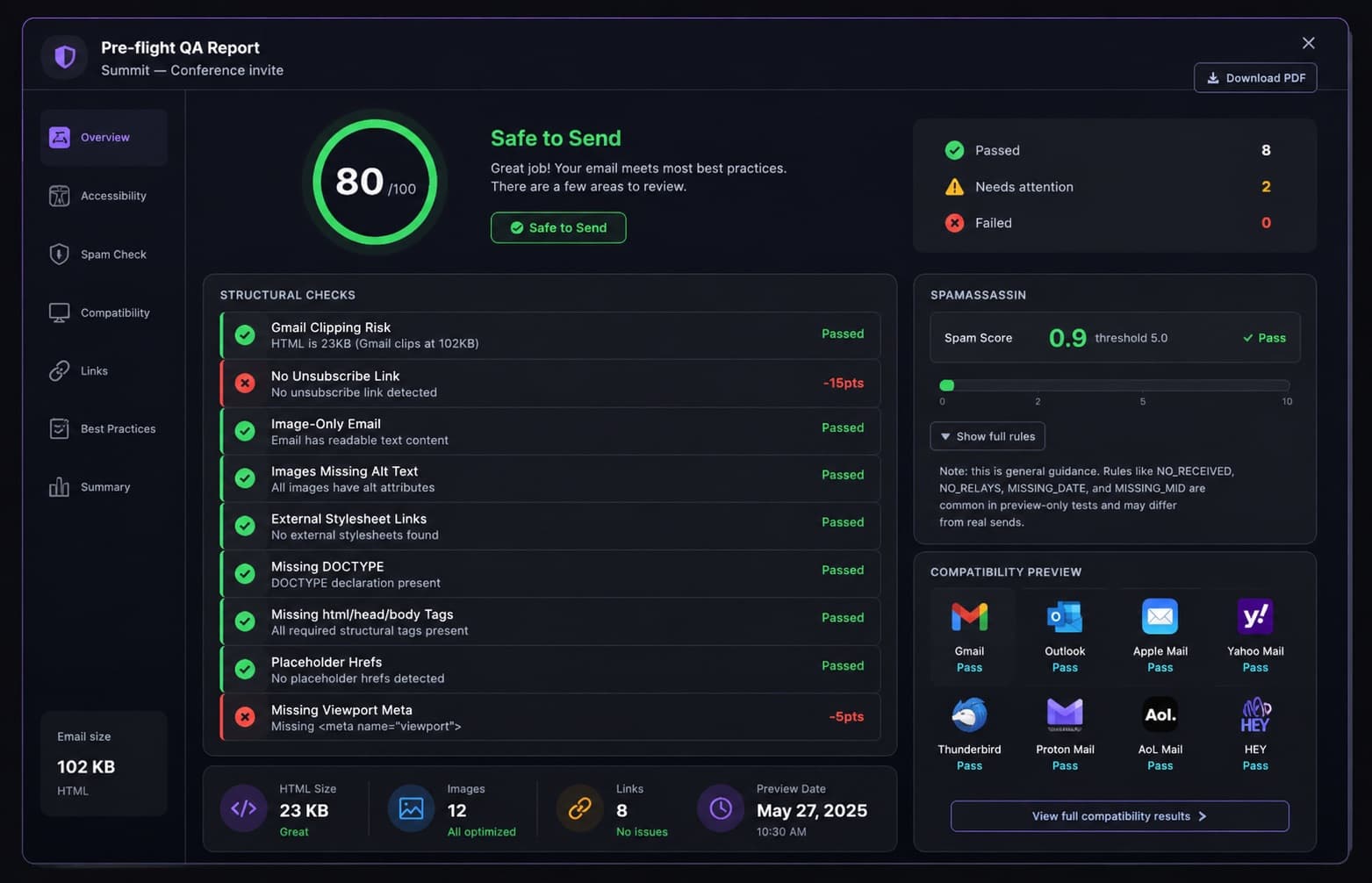
Here's the Email Builder's superpower: once your email is designed, it validates itself. A full pre-flight — dark mode, accessibility, spam and cross-client compatibility — runs in seconds, right inside the builder.
- Dark-mode preview — catch inverted colors before subscribers do.
- Accessibility checker — 43 axe-core rules, alt text, contrast and structure, flagged automatically.
- SpamAssassin score — the industry-standard engine, with a per-rule breakdown.
- Cross-client compatibility — know how it renders in the 21 email clients we document.
- Shareable preview links & test sends — get sign-off before you launch.
How it compares
A different workflow, not just another builder.
Most builders stop at export and leave you guessing how the email actually renders. The MailViewr Email Builder loops preview and QA back into the same place you build — so what you ship is what you already checked.
Export-only builders
MailViewr Email Builder
FAQ
Questions, answered.
An HTML email builder lets you design responsive email templates visually — dragging in text, images, buttons and columns — and then export clean HTML you can send through any email service provider. The MailViewr Email Builder is a drag-and-drop HTML email builder with built-in preview and validation.
MJML is a markup language that abstracts the complexity of responsive HTML email. The MailViewr Email Builder uses MJML under the hood so your emails render reliably across clients, and you can edit MJML directly or export it alongside HTML.
Yes. The Email Builder exports clean, standards-based, table-friendly HTML with one click. The output works with Gmail, Outlook, Apple Mail and any ESP such as Mailchimp, Klaviyo, SendGrid or HubSpot.
Yes. Because the Email Builder is built on MJML, it generates bulletproof HTML that renders reliably in Outlook — including the desktop versions that use Microsoft Word's rendering engine. You can also preview and compatibility-test Outlook before sending.
Yes. The Email Builder includes built-in dark-mode preview so you can catch inverted colors, washed-out logos and contrast issues before your subscribers ever see them.
Yes. The Email Builder runs your email through SpamAssassin — the industry-standard open-source spam engine — and returns your score, the pass/fail threshold and a per-rule breakdown so you can fix issues before you send.
The Email Builder's accessibility checker scans your email for missing alt text, low color contrast and structural issues that make emails hard to read for people using assistive technology — and flags them so you can fix them in the editor.
Yes. The Email Builder exports standard HTML that you can paste or import into Mailchimp, Klaviyo, HubSpot, SendGrid, Brevo, Constant Contact and any other email platform.
Absolutely. The Email Builder isn't a black box — developers can work in MJML, export clean HTML, import existing templates, and rely on version history and snapshots for real template version control.
Yes. You can import existing MJML or HTML into the Email Builder and keep editing visually or in code — so you don't have to rebuild templates from scratch.
Yes. The Email Builder works for newsletters, promotional campaigns, welcome and onboarding emails, transactional messages, event invitations and more — start from a template or a blank canvas.
Yes. Generate a shareable preview link so teammates or clients can review the email in the browser and sign off before it goes out — no account needed to view.
Yes. Send a real test email to your own inbox straight from the Email Builder to see exactly how it looks in your actual email client before launching.
No signup is required to try it — open the Email Builder and start building right away. Creating an account unlocks the full Email Readiness suite (spam, QA, and compatibility checks) before you send.
Litmus offers real-device screenshot testing across a much wider client matrix, but it is now enterprise-only — no self-serve signup and no published plan pricing. MailViewr covers the highest-volume clients with a rendering engine instead of screenshots, publishes per-client accuracy figures, and adds a builder Litmus doesn't have. Litmus is the stronger pick for pixel-perfect QA across niche clients; MailViewr is the one you can start using today without a sales call.
Weighing it against Litmus? Read the full, honest comparison or see five other alternatives
Part of MailViewr
Works seamlessly with MailViewr.
The Email Builder is backed by the wider MailViewr toolkit. When your design is ready, preview it, run a QA report and export — all a click away.